Install
Install, use, remove.
One file in the game folder. No installer, no patching, nothing to undo but deleting that file.
Requirements
- MX Bikes from Steam, on Windows (64-bit).
- Graphics with OpenGL 4.6. Keep your driver up to date. So far it has been tested on NVIDIA; AMD and Intel graphics are not tested yet.
- No other
opengl32.dllin the game folder. ReShade and some other graphics tools use the same file name, and only one of them can be installed.
Install
Close MX Bikes
Quit the game fully first.
Copy one file
Put
opengl32.dllin the MX Bikes folder, next tomxbikes.exe. With a default Steam install that isC:\Program Files (x86)\Steam\steamapps\common\MX Bikes. In Steam you can also right-click MX Bikes → Manage → Browse local files.Start the game
Launch MX Bikes from Steam as usual. On the first start MXB Evolved writes its settings file, and the effects come on.
Keys
- Ctrl + F10
- Effects off / on, for a direct before and after.
- F8
- Opens the menu: presets, sliders, Save. Mouse clicks on the menu also reach the game behind it, so open it on track, not in the game's own menus.
- F9
- Reloads the settings file.
- F12
- Saves a screenshot of the finished frame (without the menu) to
%LOCALAPPDATA%\mxb-evolved\screenshots.
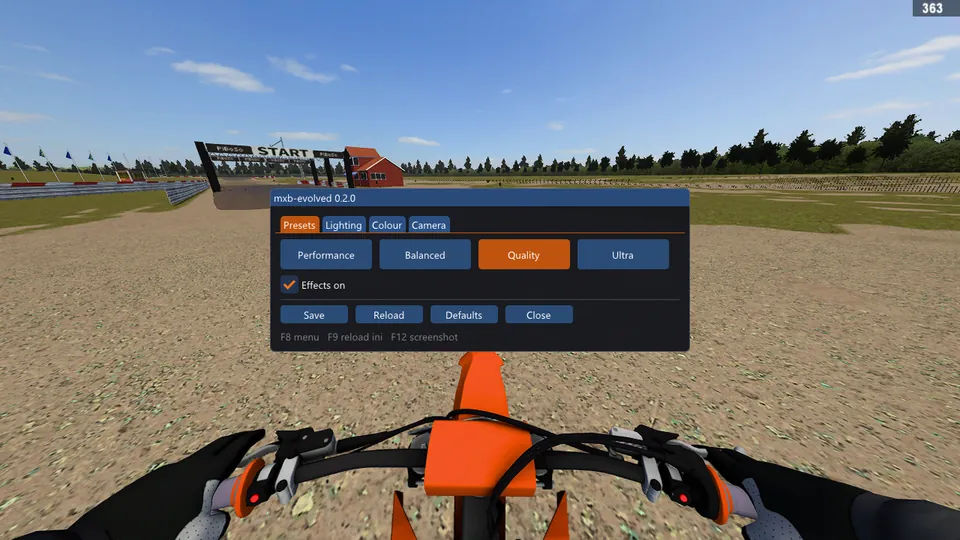
The F8 menu (shown in an early build).
Settings file
Settings live in %LOCALAPPDATA%\mxb-evolved\mxb-evolved.ini. It's written on the first start and re-read once a second while the game runs, so edits apply live. The menu's Save writes to the same file. The main entries:
[main]
enabled=1            ; 0 = pure pass-through (restart the game)
[effects]
on=1                 ; 0 = effects off (live)
ao=1.0               ; ambient occlusion strength, 0-1.5
ao_radius=1.0        ; metres
taa=1                ; temporal anti-aliasing
aa=1                 ; FXAA anti-aliasing when taa=0
motion_blur=1        ; camera shutter blur
shutter=120          ; exposure 1/x s
attached_m=1.6       ; nearer pixels move with the camera (your bike, hands): kept sharp
bloom=0.12
bloom_threshold=0.75
shafts=0.30          ; sun rays when the sun is in view
sharpen=0.35
contrast=1.15
saturation=1.0
vibrance=0.35
white_balance=0.10   ; + warmer, - cooler
vignette=0.15
enabled=0 turns MXB Evolved into a plain pass-through: the game runs exactly as without it. The log is %LOCALAPPDATA%\mxb-evolved\mxb-evolved.log (the previous run is kept as .log.1).
Uninstall
- Close MX Bikes.
- Delete
opengl32.dllfrom the MX Bikes folder. The game is back to stock right away. - Optional: delete the
%LOCALAPPDATA%\mxb-evolvedfolder to remove settings, log and screenshots.
MXB Evolved never changes the game's files, so there is nothing else to restore. Steam's "Verify integrity of game files" doesn't need to be run.
If nothing changes
- The name must be exactly
opengl32.dll. A browser may save a second download asopengl32 (1).dll; rename it. - It must sit next to
mxbikes.exe, not in a subfolder. - Press Ctrl+F10 in case the effects were switched off, and check
on=1andenabled=1in the settings file. - After a game update, MXB Evolved may not know the new build yet. It then leaves its effects off on purpose, writes why in the log, and the game runs stock until MXB Evolved is updated.
- Look at the log,
%LOCALAPPDATA%\mxb-evolved\mxb-evolved.log. If it isn't there, the game didn't load the file (see the first two points).